TAKE ADVANTAGE OF THISÂ AMAZING OFFER WHILE IT LASTS!
Your paper, handled. A done-for-you paperless system you can set up this week.
You get a prebuilt filing cabinet, tools that name and file your documents for you, and short video lessons that tie it together. Set it up once and never fight the paper pile again.
For the person whose paper piles always grow back 🤪
YEP, THAT'S ME!
Â
You've cleared those stacks before. Somehow they always come back.
That's the thing about paper. It keeps coming, every single day, in the mailbox and the backpack and the kitchen drawer.
After almost a decade of helping people go clutter-free in their homes, I've come to realize something:
paper clutter really is the gateway to a disorganized home and mind.
And it's the one category you can't beat by decluttering harder, because it's not about the thin sheets of paper covering your desk- it's about everything those papers represent.
Deadlines. Events. STUFF you need to do. People you need to pay.
MENTAL. CLUTTER.
And those piles aren't budging...they're growing.
(Let's be real, half of those papers are only still here because you're afraid to toss them. What if you need that someday?)
Paper needs a system of its own, one that lets you keep everything without keeping anything, and the last thing your brain wants to do right now is build one from scratch *bleh*.
I got you. That's exactly what Leaf to Screen gives you in a single day.
You can unlock everything you need to lose the paper clutter and have a pronto digital filing cabinet!
Unlock Leaf To Screen Today!I know I know, you know where everything is...
- Turning the papers in different directions to keep them somewhat segregated.
- Meticulously separating the stacks to different ends of the desk to indicate "priority."
- Maybe you've even gone all out with an actual color-coded labeling system with hanging racks or a full-fledged filing cabinet (you don't play)...
But new papers come in constantly. You'd need a full-time secretary to manage the influx and outflow of papers that cross your threshold.Â
Make ditching the paper clutter a no-brainer.Â
This simple 3-step Leaf to Screen framework will show you how to systematize, digitize, and secure all of your papers digitally.Â
Take the guesswork out of digital organization.
You don't have to be an "organized person" because the entire digital filing cabinet is yours to swipe. (First task ✅)
Feel confident (and secure) with your tools.
You'll learn the best practices for keeping your digital (and hardcopies) secure. Plus, discover the best apps and platforms!
Take it from my Clutter Cure students...
Soothing and not frantic...
I love Mia’s approach. It is very soothing and not frantic. It keeps me moving forward.
– Lisa
Inspiring and super approachable...
Mia is not only inspiring as she teaches but also super approachable. She makes you feel like she is rooting for you and really wants to change your life for the better through decluttering. (Allison Campbell)
– ALLISON CAMPBELL
I've included everything you need to go 100% paperless in just one day.
Here, take a look...
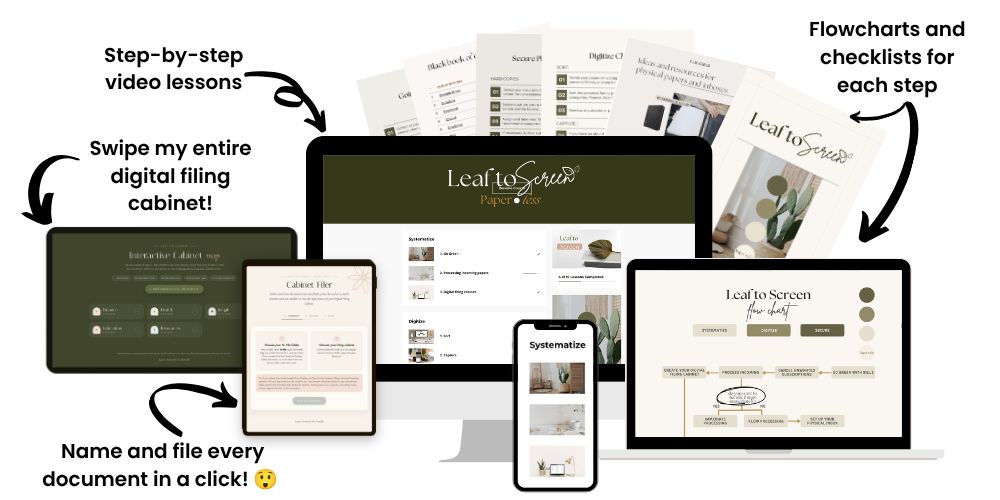
Three short lesson modules walk you through the entire Leaf to Screen process, rich with visuals, examples, and simple steps.
- You'll learn how to systematize, digitize, and secure every precious document quickly and efficiently.
- Your First Win in 10 Minutes gets your top five bills paperless today, before you go any further.
Want to make sure you follow every step?
When we're learning something foreign, it can sometimes go through one ear and out the other. That's what this Paperless Success Pack is for.Â
You'll find checklists, a flowchart, and more to pull you through every step of the process to the big finish line. Sometimes, you just need a big-picture view to see how all of the pieces fit together.Â
- Checklists for each systematizing and digitizing step.
- A flowchart to act as a roadmap to your paper clutter relief. Â
- Clickable physical and digital resources for your new paperless flow.
I'm not just going to tell you how to organize your digital filing cabinet; I'm going to give you one.
Even with clear instructions, creating a digital filing cabinet can be tedious work. But our goal is to get you paperless in a day, and I take that very seriously.
Swipe mine and use it with whatever platform you choose:
- Google Drive
- Dropbox
- Your computer, etc.
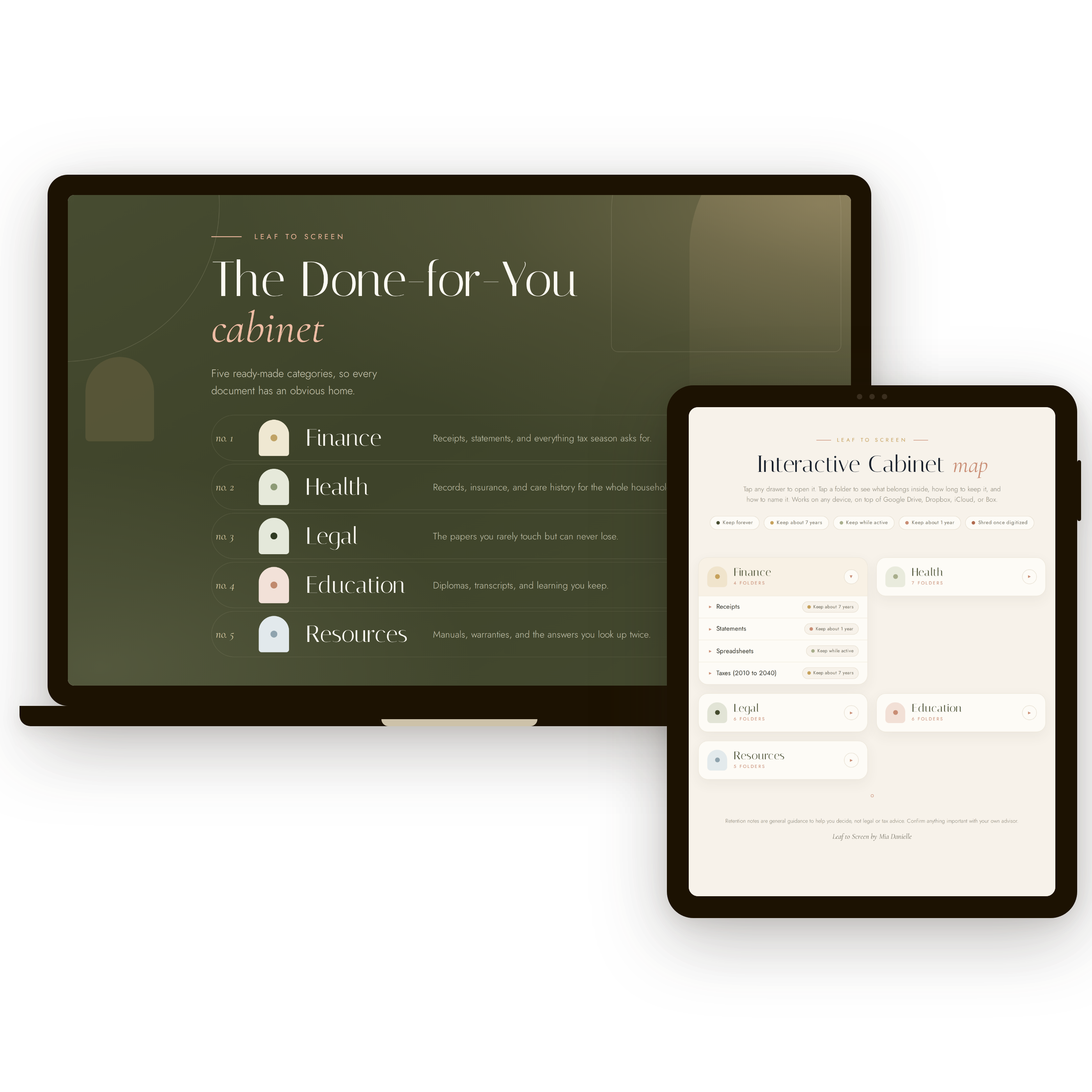
You'll get an Individual edition and a Family edition, with tax-year folders already built out and a Start Here card in every folder telling you what belongs there.
Your Interactive Cabinet Map comes with it, so you can tap any drawer to see what goes inside, how long to keep it, and how to name it.
This is the one that saves you hours.
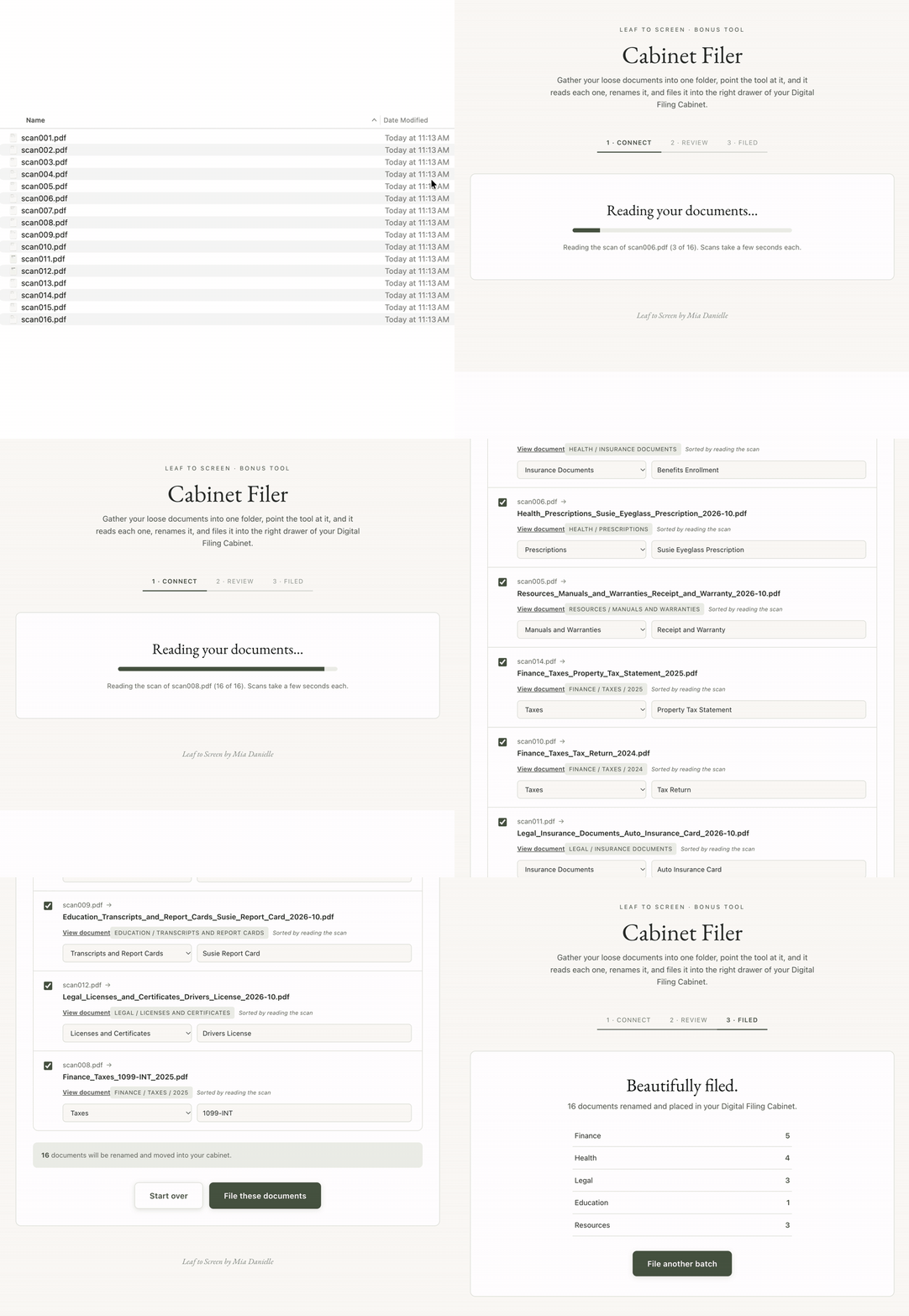
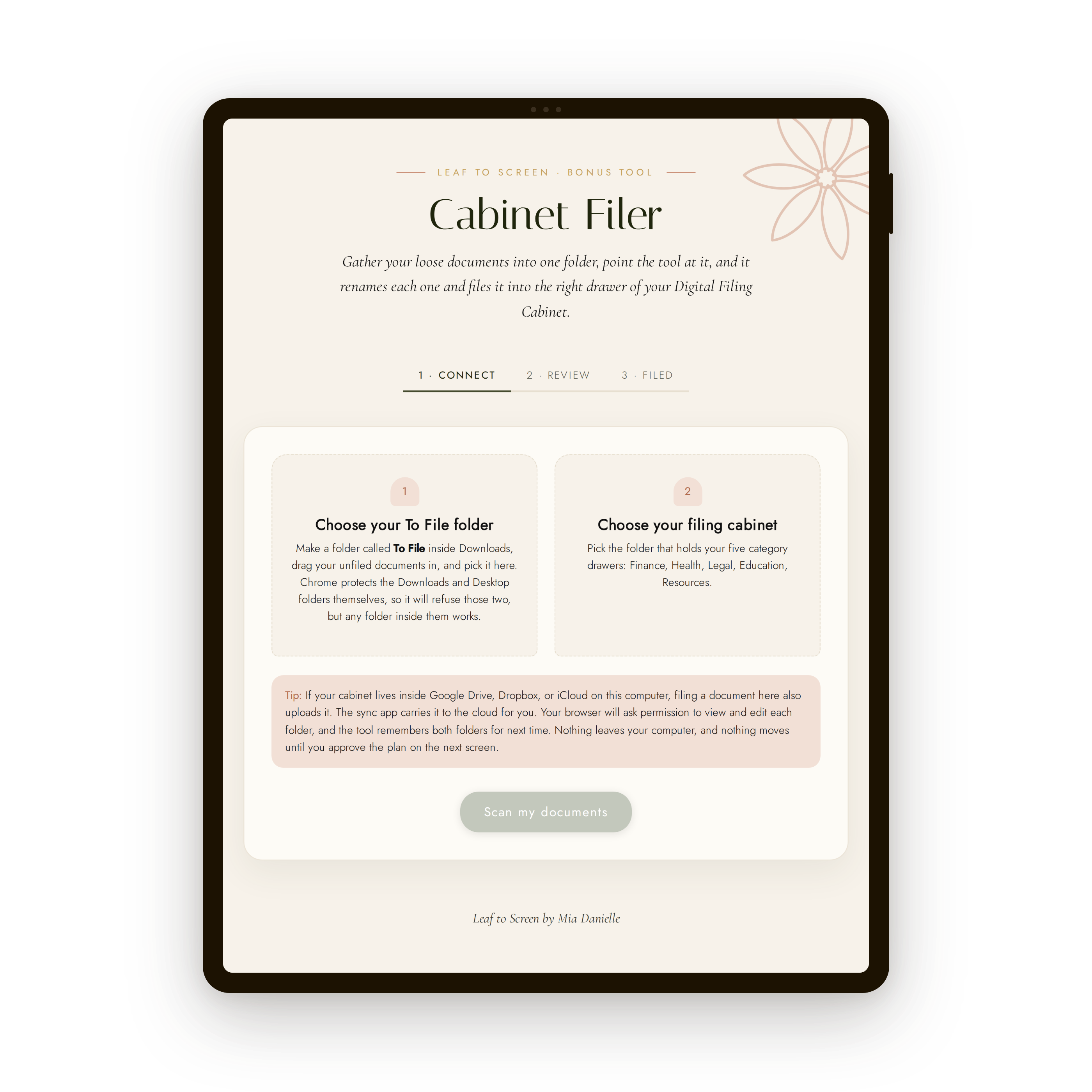
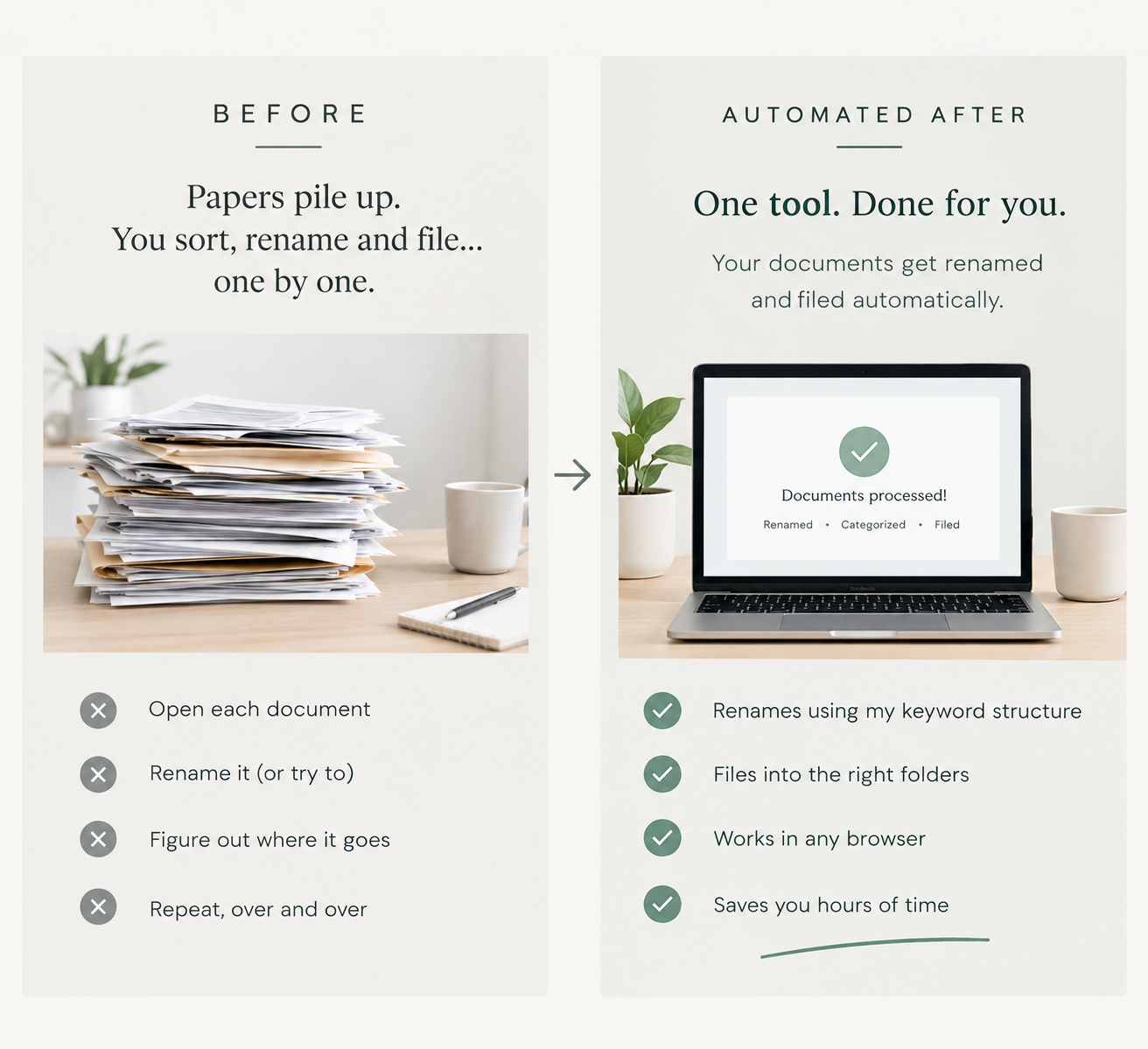
Connect your To File folder and your cabinet one time. From then on, the Cabinet Filer renames and files an entire batch of documents in a single click.
- It reads each file, suggests a clean name, and drops it in the right drawer.
- Nothing is uploaded anywhere. It all happens right on your computer.
- Runs in Chrome or Edge on a computer.
Once your whole life is digital, someone you love has to be able to reach it.
Photos, documents, accounts, passwords. All of it sits behind a login that only you know.
This bundle walks you through handing a trusted person the keys, so your family is never locked out of the things that matter most to them.
- How to decide who gets access, and how much of it.
- Setting up legacy contacts on the platforms you already use.
- Keeping everything secure while you are still using it every day.
Saving just one document?
Open the File Namer, pick the folder, and type what the document is. It hands you a clean, searchable name in seconds.
- Consistent, keyword-rich names so you can always find a file later.
- Works in any browser, on a phone, tablet, or computer.
- Perfect for the one-off papers that show up between big filing sessions.
You'll also get access to these bonuses...
Keep or Shred Guide
Settles every keep-it-or-toss-it question, with how long to hold the papers you actually need. This is what lets you finally empty the cabinet.
Household & Emergency Information Workbook
One fillable file with everything a trusted person would need in an emergency. Over 300 fields, and it never stores an actual password.
Black Book of Online Tools and Apps
My running list of favorite online tools and apps, sorted by what they help you do. Pick the one you need and start there, no rabbit holes.
Plus the Interactive Cabinet Map, your Progress Tracker, the Tech Lessons for setting up your cabinet, and access to the Paperless Community.
Paper is such a pain point for most of my Clutter Cure students that I built the finished system instead of another course about building one.
You get the cabinet I actually use, the tools that name and file your documents for you, and the short steps that tie it all together.
But with all of that mental clutter holding you back, you'll never even get close to a clutter-free haven.
Clear the paper first. It is the fastest way to feel the difference in your whole house.
Everything is waiting in your account the moment you join.
SAY NO MORE! I'M IN!Ready to get rid of the paper clutter drama and feel the relief of going paperless?
- The Leaf to Screen method + Your First Win in 10 Minutes (Valued at $127)
- Digital Filing Cabinet, Individual and Family editions, with 25+ years of tax folders built in (Valued at $67)
- Interactive Cabinet Map (Valued at $27)
- File Namer (Valued at $37)
- Cabinet Filer (Valued at $67)
- Paperless Success Pack (Valued at $17)
- Keep or Shred Guide (Valued at $17)
- Progress Tracker (Valued at $17)
- Digital Legacy Guide (Valued at $27)
- Household and Emergency Information Workbook (Valued at $39)
- Black Book of Online Tools and Apps (Valued at $17)
- Paperless Community access with support (Valued at $97)
- Tech Lessons: Set Up Your Cabinet (Included)
After completing Leaf to Screen, you will have a smooth, paperless system.
If you’re not 100% satisfied with this program after 14 days, I will gladly refund every penny you paid for it.
I'm Mia!
YouTuber, Author, Clutter-Free Living Coach.
I've been coaching people toward holistic, clutter-free spaces for about a decade now.Â
My course, Clutter Cure, is highly acclaimed and does, indeed, have a lesson or two related to my paperless system.Â
But I've come to realize that paper clutter is a special kind of clutter struggle that requires specialized attention and depth.
Paper clutter really is the gateway to a disorganized home and mind. So, I created Leaf to Screen to help! Â
See what other students have said about my teaching style...
Â
Removed the complication...
Mia removed the complication and explained things very well.
– JACKIE LEFEBVRE
Mia was so encouraging...
Mia was so encouraging throughout the course; she made me believe I could make sustainable changes.
– ROSE HURLEY
Is Leaf to Screen for you?
- You have stacks and piles of papers overtaking your space.
- You would rather start from a finished cabinet than build folders from a blank screen.
- You have some online storage, but there's really no organization to it, and you likely couldn't find anything.
- You want any document findable in seconds, from anywhere.
- You want your files protected and reachable by the right person down the road.
- OR YOU JUST WANT TO SAVE TIME WITH DONE-FOR-YOU TOOLS :)
- You want a full, whole-home decluttering program. That is what Clutter Cure is built for, and it takes this same method through every room of your house.
- You're looking for advanced digital hacks and are already a pro at digital organization.
- You want a complex productivity or second-brain system. This is an archive for your documents, and projects and tasks live somewhere else.
- You're looking to do a digital declutter (you can certainly use this system to create an awesome structure, but we're not covering decluttering digital files).
- You avoid words like "the cloud" like the plague and have no interest in going paperless on any level.
This deal won't last forever and you'll want to grab it before I realize how crazy I am for giving all of this away for such a low price.
Once you click the button, you'll be brought to a checkout page where you'll fill in your details for purchase.
Once your payment is processed, you'll immediately be granted access to everything inside of Leaf to Screen!
Frequently Asked Questions
What exactly am I gonna get once I purchase?
Do I need a scanner?
Will this work on my Mac, my PC, or my storage setup?
Do the tools work on my phone?
What about the papers I need to keep?
How is Leaf to Screen different from other courses about going paperless?
Why is Leaf to Screen priced the way it is?
Ready to lose the only thing standing between you and your counter space?
- The Leaf to Screen method + Your First Win in 10 Minutes (Valued at $127)
- Digital Filing Cabinet, Individual and Family editions, with 25+ years of tax folders built in (Valued at $67)
- Interactive Cabinet Map (Valued at $27)
- File Namer (Valued at $37)
- Cabinet Filer (Valued at $67)
- Paperless Success Pack (Valued at $17)
- Keep or Shred Guide (Valued at $17)
- Progress Tracker (Valued at $17)
- Digital Legacy Guide (Valued at $27)
- Household and Emergency Information Workbook (Valued at $39)
- Black Book of Online Tools and Apps (Valued at $17)
- Paperless Community access with support (Valued at $97)
- Tech Lessons: Set Up Your Cabinet (Included)